

Pre-Start Setup Wizard
Once CORE is installed, and VCM Live and your tune file have been downloaded successfully, we recommend following the below steps before making any modifications to your LS engine. The below setup wizard can quickly configure many of the ECU’s parameters based on the sensor hardware being used in the engine/vehicle.
| 1. | With VCM live open, key-on, engine-off check for any pre-existing DTC’s and resolve any issues reported before moving forward. |
| 2. | Ensure to resolve any mechanical issues with the vehicle before moving forward. |
| 3. | Once all DTC’s and mechanical issues are resolved, open the Setup Wizard by selecting Tune > Setup Wizard in VCM Live's menu bar. |
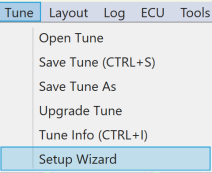
Figure 3. Opening the Setup Wizard
| 4. | Select each of the below applicable sensors and ensure to select the corresponding sensor part number being used for your specific setup. |
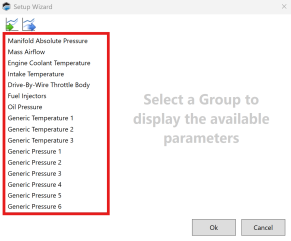
Figure 4. Wizard Sensor Setup
| 5. | After each sensor part number is selected, a list of parameters will appear. |
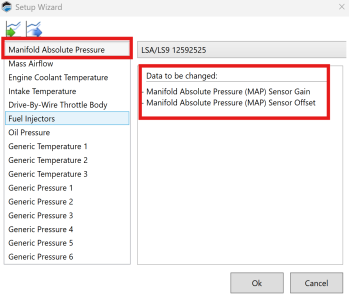
Figure 5. Wizard Parameter Checklist
| 6. | Ensure these parameters are reporting a working value within VCM live by adding Measurement & Characteristic lists. |
NOTE: Refer to the VCM Live User Guide to add Measurement & characteristic lists.
NOTE: For full description of these and all parameters, refer to the CORE Parameter Guide.
NOTE: If there is no value present in any of the above sensors, further diagnosis is needed, and no tuning modifications should be made until there is an accurate value/reading present for all the above sensors.
| 7. | Ensure fuel pump is being primed. |
| 8. | When you are finished with configuring all sensors, click OK. |
| 9. | If live tuning is enabled, VCM Live will send these updates to the ECU immediately. If live tuning is NOT enabled, click  to write the update tune to the vehicle. to write the update tune to the vehicle. |
| 10. | Once all sensors have had their corresponding part numbers selected within the Setup Wizard and all sensors show a working value within VCM live, modifications can be made to your vehicle. |
NOTE: The setup wizard will not remember your settings the next time you open it. This is to prevent accidentally programming a second vehicle with the wrong settings.
